
Admin Quickstart
Set up the GitLab artifact-first workflow after obtaining access to the private PatchPatrol image and a valid Self-Hosted License.
This guide is for a project maintainer or equivalent administrator who is adding PatchPatrol to a GitLab CI pipeline. The documented setup uses the GitLab CI component and starts in artifact-only mode.
Start with the GitLab artifact workflow. The local GitLab MR runner is maintainer tooling and is not part of this setup.
Before you start
Before setup, obtain credentials for the private PatchPatrol image and a valid Self-Hosted License:
- Private PatchPatrol image access: authenticated access to
registry.patchpatrol.ai/patchpatrol:latest. - Valid Self-Hosted License: a Signed License supplied through
PATCHPATROL_LICENSEorPATCHPATROL_LICENSE_FILE. See Self-Hosted License v1 for the license requirements.
This guide does not issue either credential.
If you are still evaluating fit, start with What is PatchPatrol?. Use Security & Privacy and Architecture to review the code-data and runtime boundaries before proceeding.
If either prerequisite is missing,
Discuss a private GitLab review pilot
.
Outcomes
- The GitLab component resolves at the pinned release.
- The readiness check exits with status 0.
- The review job completes and writes JSON, Markdown, and HTML Run Reports.
- GitLab merge-request feedback appears only when you enable it.
Check prerequisites
Start with these requirements:
- A GitLab project with merge request pipelines enabled.
- Runner access to the selected provider endpoint.
- A PatchPatrol image such as
registry.patchpatrol.ai/patchpatrol:latest. - Admin access to the CI variables and pipeline configuration for the project.
Authentication is required before pulling images.
Success check
- You know which GitLab project will host the first review flow.
- You can edit CI variables for that project.
- You have a reachable provider endpoint and a model choice for the first run.
Confirm access and roles
The admin owns invitations, repository setup, CI configuration, and the first review handoff. The developer needs access to open merge requests, view pipeline results, and read the generated review artifacts.
Use Access and roles for invitations, role handoffs, and the minimum token and membership requirements.
Success check
- You know which actions stay with the admin and which actions move to the developer.
- Developers know they should wait for the setup handoff before expecting a runnable review flow.
Connect the GitLab project
Set PatchPatrol up on the GitLab project that will host the first review workflow:
- Add the pinned PatchPatrol GitLab component include to merge request pipelines when the component is available on your GitLab instance.
- Use the direct image job from Installation and upgrades only when the component is not published for your instance yet or a custom image workflow is required.
- Make sure the target branch is fetchable from the runner.
- Keep the workflow centered on merge request review rather than local-only or operator-only variants.
Success check
- A merge request pipeline exists for the project.
- The review job is attached to that path instead of a separate dedicated side workflow.
For installation and upgrade steps, use Installation and upgrades.
Configure the review path
For the first setup, use:
include:componentpinned to a published PatchPatrol component SemVer tag- component image left at the default
registry.patchpatrol.ai/patchpatrol:latest AI_REVIEW_OUTPUT_DIR=.ai-reviewAI_REVIEW_FEEDBACK_MODE=artifact-onlyAI_REVIEW_MODEL=<supported model>AI_REVIEW_PROVIDER=ollamawithOLLAMA_HOST=<reachable endpoint>orAI_REVIEW_PROVIDER=openaiwithOPENAI_BASE_URL=<reachable endpoint>andOPENAI_API_KEYwhen required- Optional:
AI_REVIEW_PROVIDER_ALLOWLIST_BASE_URLS=<exact normalized provider base URL(s)>when you want to restrict provider calls to known endpoints
Keep the first rollout in artifact-only mode so the team can verify the generated outputs before enabling optional merge request feedback.
Keep stable review policy in .ai-review.yml when it should travel with the
repository, for example model/provider defaults, review context mode, fail
policy, and review.rules. Keep provider endpoint values, provider keys,
registry credentials, allowlist controls, and optional GitLab feedback tokens in
masked/protected GitLab CI/CD variables. Do not check secret values into
.gitlab-ci.yml or .ai-review.yml.
Configure the Self-Hosted License
Real-provider review work requires a valid Self-Hosted License. Configure exactly one runtime source:
- Store the Signed License payload in a masked/protected CI variable named
PATCHPATROL_LICENSE. - Mount the Signed License as a secret file and set
PATCHPATROL_LICENSE_FILE=/run/secrets/patchpatrol-license.jwtto the mounted secret file path.
Do not paste either value into component inputs, .gitlab-ci.yml, or
.ai-review.yml. The component remains orchestration-only, and repo-local
policy is safe to version with source code only because license material and
license paths stay outside it.
Validate the same runtime wiring before the first review:
ai-review license inspect --jsonThe command exits 0 for a valid license and 12 for a missing or untrusted
license. It prints non-sensitive status, reason codes, and trusted entitlement
claims; it does not print the raw Signed License or call a provider.
Optional provider allowlist
If you set an allowlist, PatchPatrol enforces an exact normalized match before any non-mock provider call:
AI_REVIEW_PROVIDER=openai
OPENAI_BASE_URL="https://llm-gateway.internal/v1"
AI_REVIEW_PROVIDER_ALLOWLIST_BASE_URLS="https://llm-gateway.internal/v1"AI_REVIEW_PROVIDER=ollama
OLLAMA_HOST="http://ollama.internal:11434"
AI_REVIEW_PROVIDER_ALLOWLIST_BASE_URLS="http://ollama.internal:11434/"Mock runs skip remote provider calls, so optional provider allowlists only affect non-mock providers.
Use Configuration Reference for the exact variable contract and Troubleshooting when a trust-gate failure blocks the run.
Example: first review job
Use the component include for the first rollout when the component is available on your GitLab instance:
include:
  - component: $CI_SERVER_FQDN/patchpatrol/components/gitlab-review@1.0.0
    inputs:
      feedback-mode: artifact-only
      readiness-mode: 'off'
      output-dir: .ai-review
Self-managed GitLab instances may need a mirrored or local PatchPatrol component project and local Catalog setup before the include can resolve. Turn on GitLab readiness only when MR feedback is enabled and the job has the required token/context.
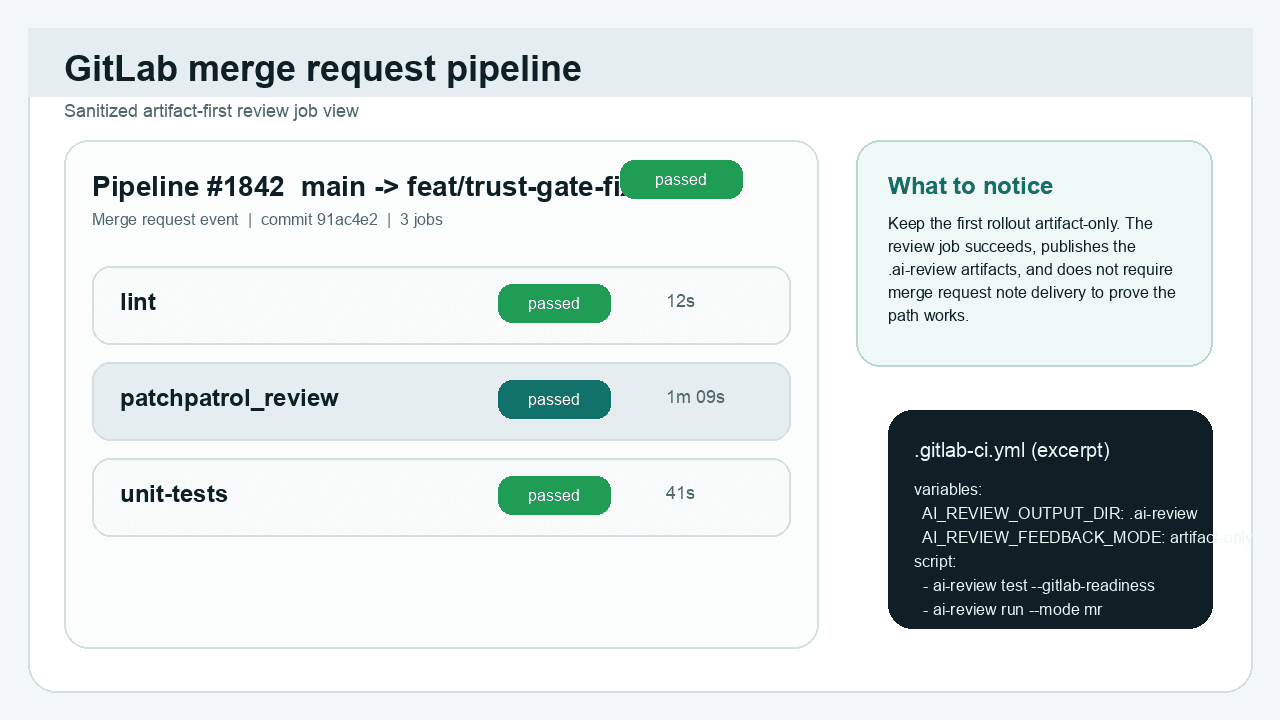
What to notice: the PatchPatrol review job is the proof point. For the first run, it only needs to finish, publish
.ai-reviewartifacts, and keep MR note delivery optional.
Success check
- The review job uses the default
latestPatchPatrol image, or an explicit patch tag when needed. - Artifact output is enabled under
.ai-review. - The provider endpoint, model, feedback mode, and any optional allowlist are configured for the first run.
- Self-Hosted License wiring is valid:
ai-review license inspect --jsonexits0before the first real-provider run.
Run readiness checks
Before the first artifact-only review run, validate the provider path in the same environment the job will use:
- Run
ai-review test --chat --readiness-jsonas a non-mutating provider/config preflight. - Provide
PATCHPATROL_LICENSEorPATCHPATROL_LICENSE_FILEfor real-provider chat probes; license failures exit12before provider calls. - Add
--semantic-readinessonly when the first rollout enablesdiff+semantic. - Run
ai-review test --gitlab-readiness --readiness-jsononly before enabling MR feedback with the required GitLab token/context. - Confirm the job can reach the provider endpoint it needs.
- Read the
readiness.metadatacategory before changing settings; for example, fix credentials forauthenticationand model selection formodel_unavailable. - Resolve missing access, provider, or merge request context issues before you ask developers to rely on the flow.
Success check
- The readiness check exits with status 0.
- You can explain the next step to a developer.
Open the first review flow
Open or update a merge request so the configured review job runs. After the first successful job, open the HTML or Markdown Run Report and confirm that the JSON report is present:
.ai-review/ai-review.md.ai-review/ai-review.json.ai-review/ai-review.html
Once the flow is running, hand the team forward to the Developer quickstart and First review output.
Success check
- The merge request pipeline runs the PatchPatrol review job.
- The review job produces
ai-review.html,ai-review.md, andai-review.json. - Developers can move to the next guide without needing admin-only setup details.