
Developer Quickstart
Run the supported PatchPatrol review flow, find the artifacts, and understand the next step.
Developer Quickstart
This quickstart helps a developer user move from access readiness to running and understanding the first review.
Supported public path: GitLab artifact-first
Start with the artifact flow first, then add optional merge request feedback later if your team needs it.
This guide covers the supported public SaaS path. Deeper operator, self-hosted, and private-rollout variants are outside this guide.
The local GitLab MR runner is maintainer/operator pilot tooling. The supported public path remains GitLab artifact-first CI.
Outcomes
- Confirm whether access is ready for the supported public path.
- Run the first review flow and locate the generated artifacts.
- Understand the high-level result and continue into shared output and feedback guidance.
Confirm access is ready
Before you run the review flow, make sure the admin has already connected the GitLab project, configured the review job, and shared the expected merge request path with you.
Success check
- You can access the GitLab project and merge request pipeline for this workflow.
- You know where the PatchPatrol job will appear when the review runs.
Ask your admin to confirm
If anything is still unclear, ask your admin to confirm:
- You were added to the correct GitLab project or group.
- The PatchPatrol job is configured on merge request pipelines.
- The first run is still using
artifact-onlyfeedback mode. - The provider endpoint, model, and readiness checks are already in place.
For the canonical handoff and access details, use Access and roles.
Run the review flow
Open or update the merge request that should be reviewed, then wait for the PatchPatrol job to complete on the supported GitLab pipeline path.
- Use the normal merge request workflow for your team.
- Watch the review job instead of looking for inline merge request comments first.
- Treat the artifact output as the baseline source of truth for the first successful run.
Success check
- The PatchPatrol review job finishes on the merge request pipeline.
- You can open the job page and inspect its artifacts.
Find the review artifacts
Go to the completed review job and open the generated artifacts:
ai-review.mdfor the human-readable Markdown Run Reportai-review.htmlfor the printable browser reportai-review.jsonfor the machine-readable review data
Start with ai-review.html or ai-review.md when you want the fastest high-level read, then use ai-review.json when you need the structured details behind the same run.
Example: locating the artifact set in GitLab
The expected artifact paths are .ai-review/ai-review.html, .ai-review/ai-review.md, and .ai-review/ai-review.json.
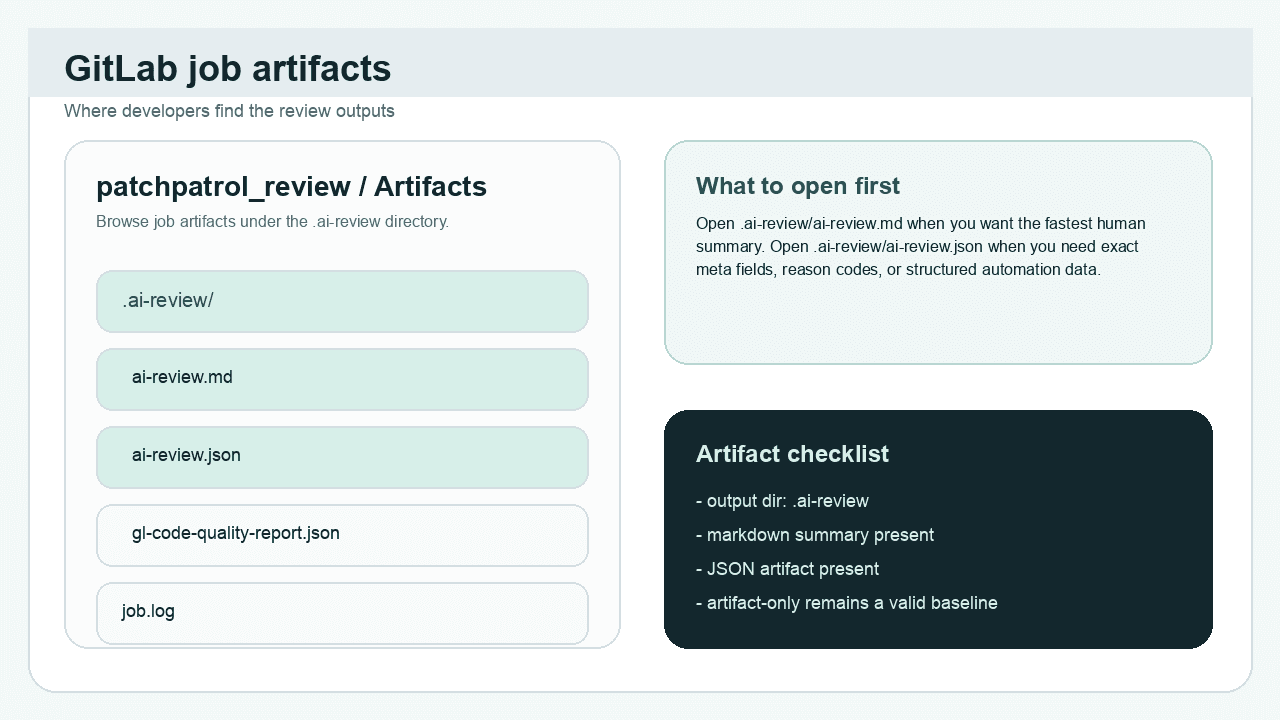
What to notice: open
.ai-review/ai-review.htmlor.ai-review/ai-review.mdfirst for the quickest read. Open.ai-review/ai-review.jsonwhen you need reason codes,meta.*fields, or data for automation.
Success check
- You can locate
ai-review.html,ai-review.md, andai-review.json. - You know which artifact to open first for a quick review of the run.
Use fingerprints when a finding is accepted
If one finding is known and explicitly accepted for now, the artifacts also give
you the value PatchPatrol uses for an accepted-finding baseline: fingerprint.
- look for the finding
fingerprintinai-review.mdorai-review.json - add that value to repo-root
.ai-review-baseline.yml - add a short human-readable
reason - commit the baseline change with the code or policy decision that justifies it
Minimal example:
version: 1
suppressions:
  - fingerprint: 0123456789abcdef
    reason: Accepted during phased rollout until auth refactor lands
Keep the two repo-root files distinct:
.ai-review.ymlstores safe repo-local review defaults.ai-review-baseline.ymlstores accepted findings by exact fingerprint
When the same finding appears on a later run, PatchPatrol evaluates fail-on policy only against unsuppressed findings, but still keeps suppression evidence visible in the artifacts.
Interpret the result
Use the first run to answer three questions:
- Did the review complete on the supported path?
- What findings or risk signals appear in
ai-review.md? - Do you need the structured detail in
ai-review.jsonto triage or automate follow-up?
This guide keeps interpretation at the high-level result layer. The shared follow-on pages cover deeper output reading and optional delivery modes next.
Success check
- You can explain the outcome of the run at a high level.
- You know when to stay in the markdown summary and when to open the JSON artifact.