
First Review Output
Find the generated PatchPatrol artifacts, understand the high-level result, and decide what to do next.
First Review Output
Supported public path: GitLab artifact-first
Treat the generated Run Reports as the source of truth for the first successful review.
Where to look first
| Artifact | What it is for | Start here when |
|---|---|---|
ai-review.html | Static printable HTML Run Report for one execution | You want the cleanest management-facing read or a browser PDF export |
ai-review.md | Human-readable Markdown Run Report with the run outcome and findings | You want the fastest read of the outcome |
ai-review.json | Canonical machine-readable Run Report for the same execution | You need structured details for triage or automation |
Go to the completed review job in GitLab and open the artifact list under .ai-review/.
ai-review.json, ai-review.md, and ai-review.html are Run Reports for one
PatchPatrol execution. They do not own the merge request's cross-run Active
Finding Set; that state belongs to the optional persistent GitLab Review
Summary.
ai-review.html is generated by default and is only a presentation layer over
the same validated report payload used by ai-review.md and ai-review.json.
It can include report context, Review Outcome, findings, token usage, and
risk-oriented visual treatment where that metadata is available. Use it for
reading and sharing, not as a separate source of truth.
Example: when to stay in ai-review.html, ai-review.md, and ai-review.json
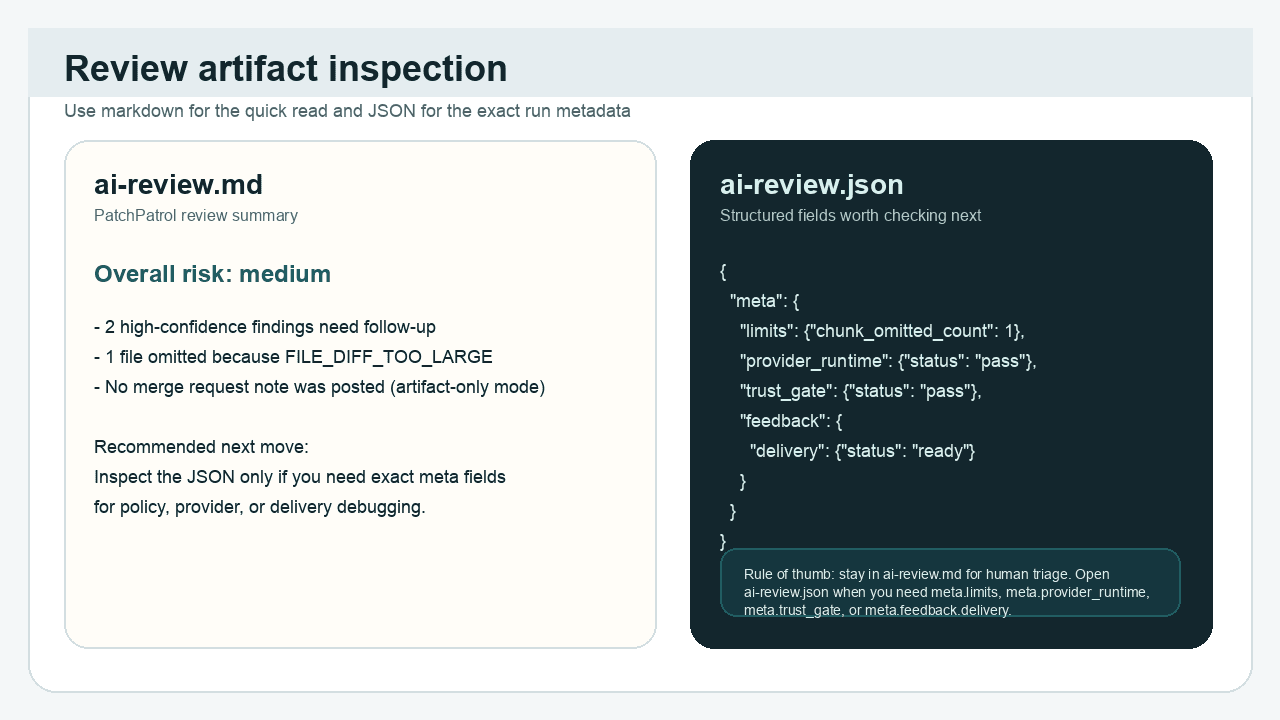
Use this rule of thumb:
- Start with
ai-review.htmlwhen you want the cleanest printable presentation of the same validated report payload. - Stay in
ai-review.mdwhen you want the fastest human summary, top issues, and overall outcome. - Move to
ai-review.jsonwhen you need exact metadata such asmeta.limits,meta.repository_context,meta.provider_runtime,meta.trust_gate, ormeta.feedback.delivery.
When repository-aware rules are configured, human Run Reports and the GitHub
Actions job summary can show compact repository-context lines rendered from
ai-review.json. Use Repository-aware rules
to interpret rule counts, source categories, disablement, and the no-memory
boundary. The persistent GitLab Review Summary excludes these diagnostics.
What it means
The first successful review means more than “the job turned green.” It means:
- The review completed on the supported GitLab artifact-first path.
- The expected artifacts were written and can be opened.
- Your team can read the high-level result in the Markdown Run Report and confirm whether follow-up is needed.
Use the HTML or Markdown Run Report to understand the headline outcome, then
move to ai-review.json only when you need the structured representation of
the same execution.
If your team is building integrations, continue with the Artifacts & schema reference.
For version and release awareness, use Release and versioning.
What to do next
Once you can find and interpret the artifacts, choose the next supported step:
- Stay artifact-first if the team is still validating the basic workflow.
- Continue to Feedback modes when you are ready to compare artifact-only output with optional MR delivery.
- Use Reference or Troubleshooting if you need deeper follow-on guidance.
Next step: Feedback modes